Clearer Workflows for Calibration and Fire-Protection Teams
Whether your company is large or small, BAS Software Solutions builds focused Windows applications that help technical teams work more efficiently, maintain dependable records, and produce professional documentation.
Purpose-Built Software for Work That Cannot Be Generic
Each product is being designed around the real sequence of its work—so technicians receive useful guidance without losing control of the job.
In active development
Calibration Suite
Professional calibration-management software for companies that perform instrumentation calibrations. Connect the customer, job, instrument, calibration results, final report, and historical record in one organized workflow.
Guided instrumentation calibration workflows
Customer, job, instrument, and test-equipment records
Professional reports and calibration history
Local-first Windows operation and customer-controlled data
NFPA-based fire-protection inspection and commissioning software for companies responsible for recurring inspections, project closeout, system documentation, deficiencies, and professional reports.
Inspection Mode and Project Mode
Fire alarm and specialized system workflows
Clean agent, VESDA, preaction, deluge, foam, and aerosol
Device inventories, deficiencies, photographs, and reports
Move from the company overview into the product information that matters to your team. Each product has its own purpose, workflow, documentation, and development path.
Starting at US$399/year·Complete software·No artificial feature tiers
Calibration Suite
—□×
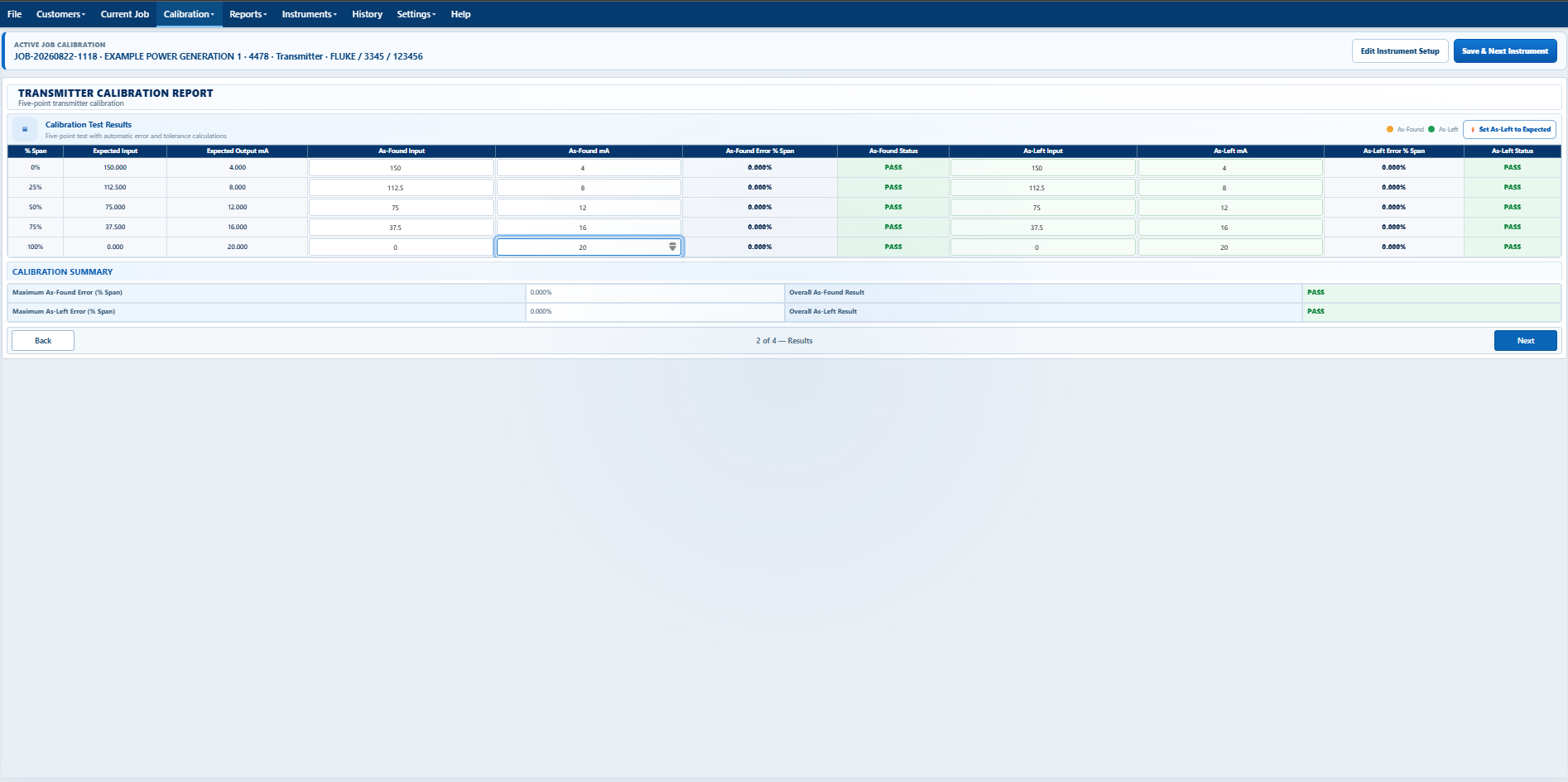
Guided calibration results
✓Structured workflow
From setup to documented results
01
Guided Calibration Workflow
Move clearly from setup through calibration and reporting.
02
Less Repetitive Data Entry
Reuse technician defaults, instrument data, and dates.
03
Professional Final Reports
Turn recorded work into organized customer documentation.
One connected process
From Customer Setup to Final Report
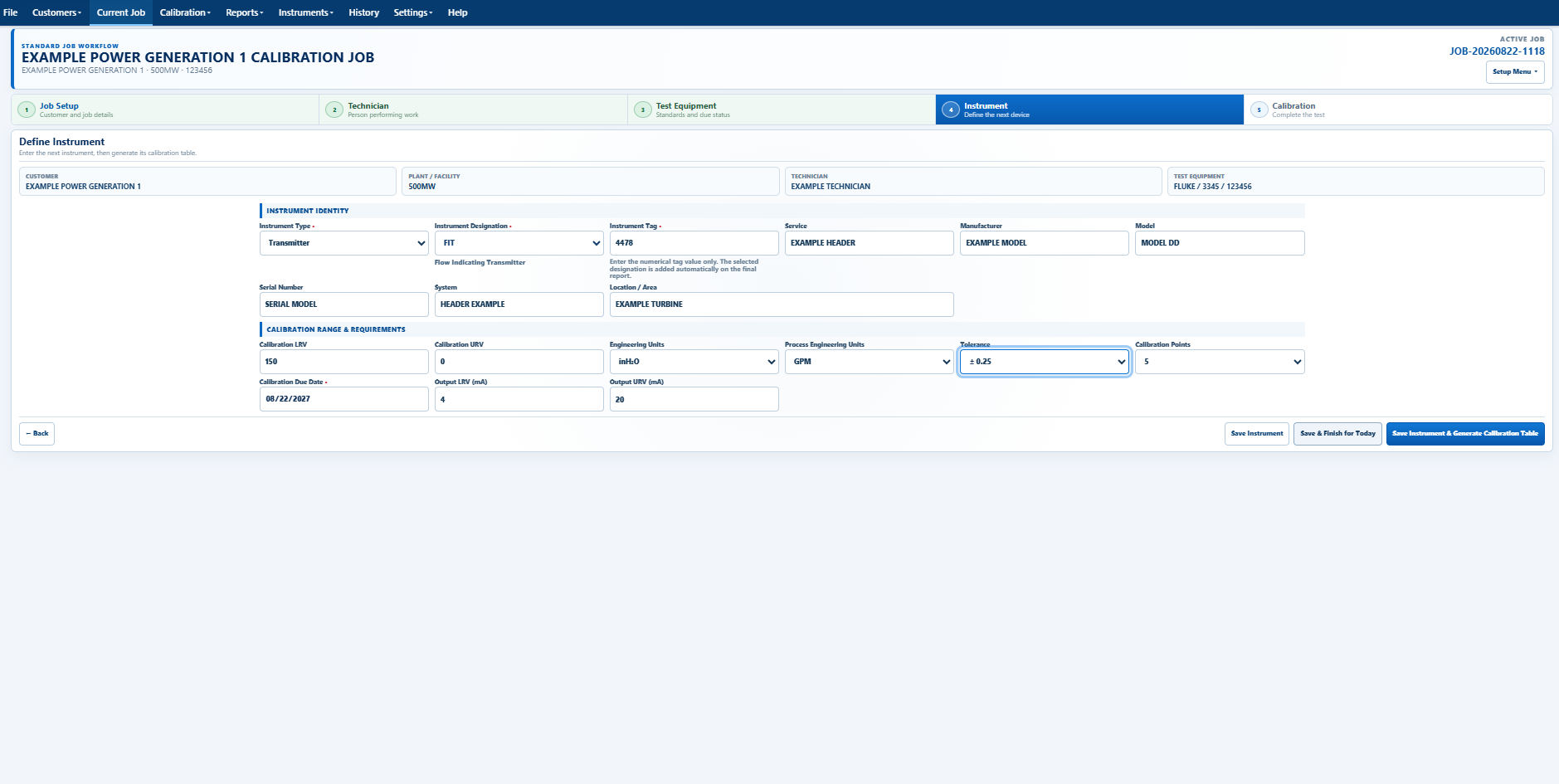
Calibration Suite keeps every stage connected, guiding technicians through the work while organizing the information needed for professional documentation.
1CUCustomer
Select or create the customer
2JBJob
Set up the current work
3INInstrument
Choose or define the device
4CALCalibration
Follow the guided workflow
5RPFinal Report
Review and document results
6HIHistory
Return to previous records
Designed around the technician
Built Around Real Calibration Work
Calibration Suite handles routine organization and repeated documentation so technicians can stay focused on completing accurate calibration work.
TD
Technician Defaults
Store commonly used technician information and apply it to future work.
31
Automatic Dates
Let Calibration Suite supply appropriate dates throughout the workflow.
DB
Instrument Database
Reuse organized instrument records instead of starting over.
7×
Multiple Calibration Types
Guided workflows for pressure gauges, pressure transducers, temperature indicators, transmitters, switches, RTDs, and thermocouples.
HX
Records and History
Locate previous jobs, reports, and instrument activity more easily.
BK
Backup and Restore
Help protect important customer, instrument, and calibration information.
Explore the instrument families and registered transmitter types in Calibration Suite. The full feature list identifies current calibration workflows and additional workflows under review.
Pressure GaugesPressure and differential pressurePressure Transducers4–20 mA, 1–5 V, 0–10 VTemperature IndicatorsTemperature indication verificationTransmittersPressure (PIT), Level (LIT), Flow (FIT), Temperature (TIT)SwitchesPressure, differential pressure, temperatureRTDsPt50, Pt100, Pt200, Pt500, Pt1000ThermocouplesB, E, J, K, N, R, S, T
United States pricingPrices shown in U.S. dollars (USD).
01
First Windows computer
Complete Calibration Suite
US$399per year
02–03
Second and third computers
Same complete software on each computer
US$300each, per year
04+
Every computer above three
The same approved formula continues beyond ten computers
US$250each, per year
✓
Payment-processing costs are included in the published price. Required sales taxes are added separately at checkout.
Free technician resources
Useful Calculators—Ready When the Work Starts
Open practical field calculators for signals, temperature sensors, calibration error, tank volume, and switch deadband. No account or download is required.
Process Control CalculatorTemperature SensorsError & ToleranceTank VolumeSwitch Deadband
Common questions
Clear Answers Before You Get Started
The homepage keeps this list short. More detailed product, licensing, trial, and support guidance will remain available in the full Calibration Suite resource center.